

Written by: Vihan Patel, Head of AI Solutions, Mantel
Key takeaways for business leaders:
- System One models such as TypeSafe AI’s Jev answer fixed questions in well under a second, fast enough to run on every keystroke or page view.
- They let search pages, webforms, and FAQs accept free text and respond to context without adding a chatbot.
- We cover four patterns: a UI that changes shape as you type, filters written in the shopper’s own words, re-ranking recommendations for new shoppers, and live feedback on forms.
- They read what a customer says well, but can’t learn from what customers do, so they work alongside recommendation engines rather than replacing them.
- Start with the search bars and forms where customers already type.
A few months ago, we published our top design principles for creating agentic products. The top three principles were: don’t become over-reliant on chat; let the interface carry the interaction; and use the interface for exploration, not just resolution.
About a month later, a new family of AI models called System One models was released. They’re fast and flexible enough to make those principles practical: they read intent as the customer types, adapt the interface on the fly, and respond to context without a chat window.
Our introductory article covered the basics: System One models such as TypeSafe AI’s Jev only answer from options you define, which makes them very cheap and very fast. This one goes deeper on one of the use cases from that piece, customer experiences, and looks at why these models offer an alternative to the now well-established agentic commerce chatbot.
Chatbots: a means to an end?
Done well, agentic commerce chatbots give customers a lot, guiding them through exploring products, comparing them, and deciding what to buy with concierge-like care. However, they have drawbacks:
- Implementation and upfront investment can be heavy
- Keeping free-text LLM output accurate, fast, and compliant is hard
- Customers may get ‘AI fatigue’, and poor experiences are heavily penalised: only 27% of customers would try a chatbot again after a bad one
Much of a chat experience’s value comes from one ability: turning a free-text description of needs, caveats, and constraints into a relevant recommendation or result. The complexity comes from everything around it, such as managing outputs, actions, and back-and-forth conversation.
As part of our experiments with System One models (we used Jev for our demos), we looked at how to bring two benefits of LLMs, context awareness and free-text input, into more traditional experiences without the complexity: no multi-turn conversation, and structured results the customer sees on screen. At 70 to 500 milliseconds per call, they’re fast enough to sit inside search pages, webforms, and FAQs without a chatbot.
Example 1: a real-time morphing UI

We often find one of the first questions when building a customer-facing agentic experience is how chat and search relate. Inspired by Shapeshift, an open-source project we mentioned in our introduction, we’ve chosen to combine search and chat, along with FAQs and customer service queries, into one widget that changes shape as you type. Jev reclassifies the customer’s intent every time the text changes.
The internet has hyped generative UI as the future of user experience (us included), but the concept faces serious headwinds in real-world deployment. One is the gap between how a user describes what they need and what the interface shows them, both in the time this takes and in its accuracy.
Sending the customer’s text to Jev on every change and letting it pick the best-fitting intent and component gives you a responsive, evolving UI that may be a useful alternative to true ‘generative’ UI.
Example 2: soft filtering

Traditional filters work on attributes someone has already tagged, like brand or price. Shoppers often think in needs instead (‘dishwasher safe’, ‘suits a six-year-old’), and those rarely exist as a facet, so this kind of requirement is typically handled by AI chatbot features.
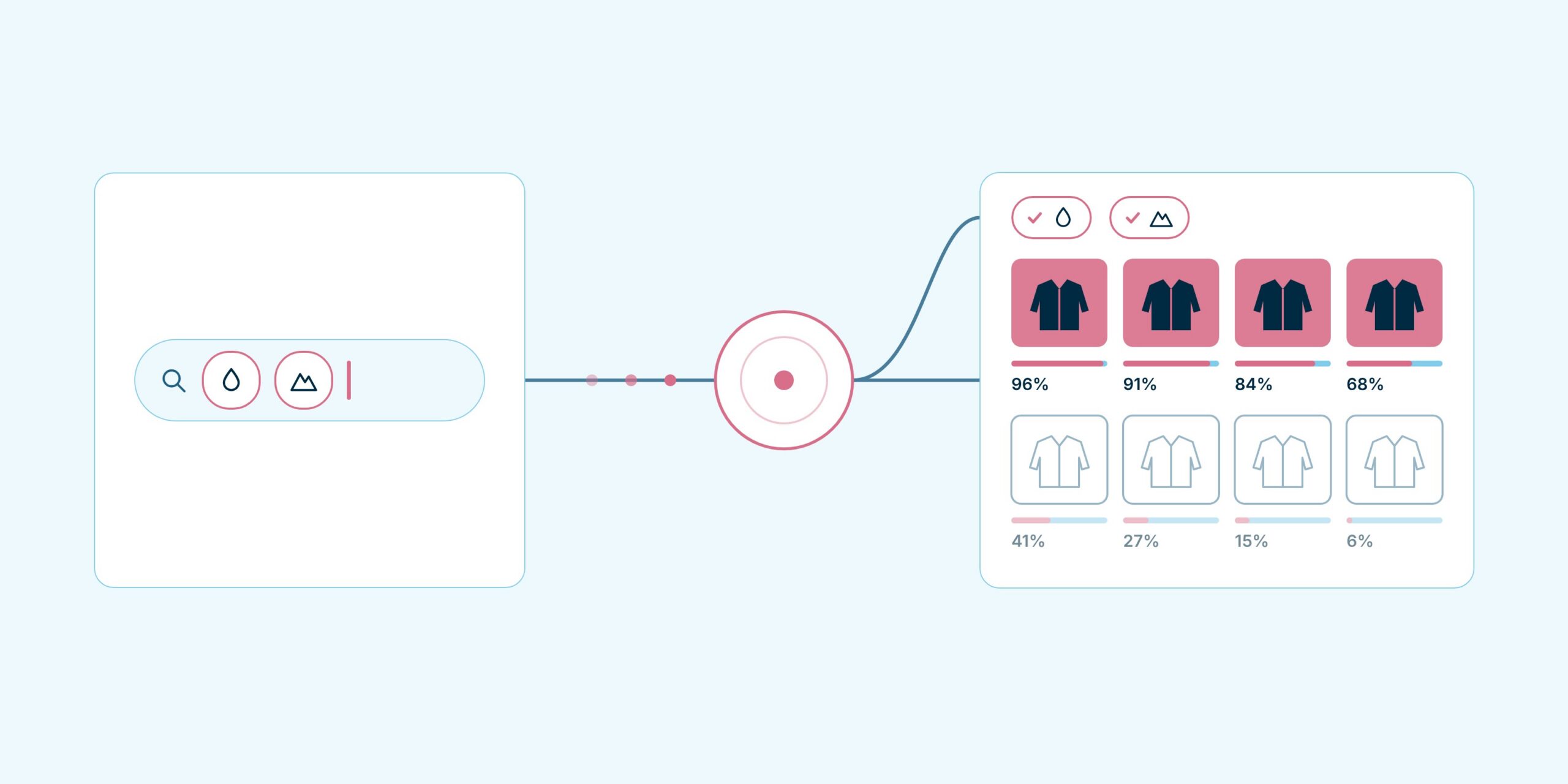
In the retail demo we previewed in our introduction, shoppers type the filter in their own words and Jev checks every product on the page against it: 48 products means 48 yes/no questions, asked in parallel, each with a probability attached. That probability is what makes the filter soft: strong matches can rank above borderline ones instead of passing or failing on a single tag, and because Jev is trained for calibration, the probability is a reliable signal to rank on.
We built two views on top of the same answers. The first behaves like a normal filter on the product grid, while the second is a comparison table, with the shopper’s own criteria as rows, the products they’re weighing up as columns, and Jev’s verdict in each cell, so they can see which product meets which need.
Those two views are a starting point. A wine retailer could score every bottle against two tasting notes, say ‘crisp and mineral’ and ‘rich and oaky’, and plot its range on a two-axis map showing which bottles sit closest to each style.
Example 3: re-ranking recommendations for shoppers you don’t know yet
Recommendation engines learn from behaviour, so they struggle with a shopper they know nothing about. For a first-time visitor, you might only have a search query and a couple of page views, and the usual fallback is a list of bestsellers.
Our theory, which we haven’t tested yet, is that the same per-product check behind soft filtering can re-rank that fallback. A popularity list or session-based recommender builds a shortlist of, say, 30 to 50 products, and Jev asks one question of each: given what this shopper searched for and viewed, would they want it? Shortlists suit these models; in TypeSafe’s re-ranking example on legal search, scoring a 30-passage shortlist this way lifted top-10 accuracy from 38% to 62%.
Jev makes a good re-ranker but a poor recommender, though: it reads what a shopper has told you but can’t learn from what similar shoppers went on to buy, and it gets less accurate as irrelevant detail piles up. Once a shopper has history, the trained recommender should lead, with Jev’s answers as extra inputs.
Example 4: live feedback to customers

In this example, a customer fills in a webform about a damaged order. As they write, the form shows what a damage claim needs (set in advance for that intent), which of those details their message already covers, and whether it’s compliant.
An LLM could do this too, but usually only after the customer hits submit, which means going back to fix old answers. Feedback while they’re still typing is more useful and far less frustrating.
Nothing on screen is generated. Each requirement, such as the order number or which item was damaged, is a yes/no question, so the form can only show ‘covered’, ‘missing’, or ‘unclear’, and every message the customer sees is one your team wrote.
Where to start
Our rule of thumb: if a decision depends on what the customer’s words mean, use a System One model; if it depends on what similar customers did, use a trained ML model; if it’s a known rule, write code. Keep each question to a gut call, since these are small models built for fast judgements, not reasoning.
Start where customers already type, such as the search bar or the returns form, and test it against today’s experience. As we noted in our introduction, Jev is in early access and served from the US, so data residency will be the first conversation for most Australian businesses, though OpenAI’s Decisions API and Microsoft-Decision-1 now offer alternatives.
We’ll keep sharing what we learn as these models mature. In the meantime, talk to us about where a System One model could fit in your customer experience, and how to test it against what you have today.

